Our team worked hard to prepare a nice Thanksgiving gift for our customers, and today I am happy to announce general availability of OpenRules-9! This major new release comes with a new implementation of our Graphical Explorer and Debugger as a foundation for the current and future OpenRules Interactive Decision Modeling Environment oriented to business users. Watch new Intro Video, read Release Notes 9.0.0, and evaluate it for free. Happy Thanksgiving!
Continue readingCategory Debugging
OpenRules Debuggers
OpenRules Decision Manager provides two Decision Model Debuggers:
- Graphical Debugger included in OpenRules Explorer
- Command Line Debugger described in this post.
While the graphical debugger is the most user friendly debugger, it is currently available only under Windows and Linux. The Command Line Debugger is available under Windows, Mac, and Linux. Continue reading
Rule Debugger for Business Users
Whether you like it or not, your business decision models will contain bugs like regular software always does. They will fail to produce expected results for certain inputs and under different unforeseen circumstances. As a result, their authors, who are usually business people, will have troubles to understand why certain rules were not executed while others did. For real-world business models even the best explanation reports and execution traces could be difficult to follow. When complex logical errors occur, decision model authors discover that their business rules and decision management environment is only as good as the rule debugging tools it offers! Continue reading
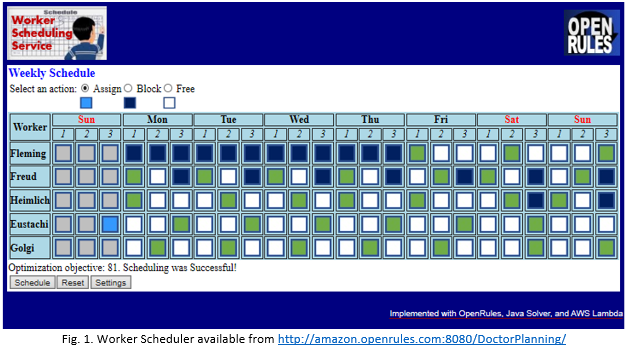
Building a Live Worker Scheduler
There are already several good responses to the DMCommunity’s April-2020 Challenge “Doctor Planning”. Below I am describing how I tried to use this challenge to create a complete decision optimization service. I ended up with a working Worker Scheduler that shows a solution for this particular challenge in Fig. 1 (click to open):
Debugging Business Decision Models
OpenRules Decision Manager 8.1.0 includes a special Rule Debugger that allows business users to debug their decision models while they are being executed. The debugger stops execution after executing the first selected rule and a user can analyze the current content of all decision variables to understand why certain rules were executed or skipped. After pushing “Enter” the next selected rule will be executed. A user may continue to push “Enter” until all rules are executed. Continue reading
OpenRules 2019 Highlights
2019 has brought lots of innovations and positive developments for OpenRules and its customers. This post summarizes all the new capabilities and user experiences that we have introduced in 2019. Continue reading
Rules Debugger for OpenRules Business Decision Models
When our customers create business decision models, they frequently want to have an ability to debug their business rules to understand when and why their rules were executed or skipped. We provided them with the Decision Model Analyzer that partially answers these questions but does it after (!) the model has been already executed. We’ve just completed the development of a new OpenRules Rules Debugger that allows a business user to debug her/his decision models while they are being executed. Continue reading