DMCommunity has already received five solutions for its Oct-2025 Challenge “Decision with two objectives” which is looking for decision models that help a web designer to select certain features while satisfying budget and value constraints. It is quite a simple problem for most linear or constraint solvers, so it is no wonder that the first 3 solutions utilized different solvers: Seeker, Pymoo, and OPL CPLEX. What makes this problem more interesting is that it involves two conflicting objectives: total value and total cost. Our decision models are supposed to devise a rational way to trade them against each other.
The author of this challenge, Dr. Meinolf Sellmann, wrote: “Seeker recommends installing 7 features (3, 4, 5, 6, 7, 9, and 10), which yields a total value of 17. This solution gives the client the maximum possible number of features. While a total value of 18 is possible, it would require reducing the number of features to just 4. The small loss in value is a favorable trade-off compared to the significant loss of features needed to get one more point in value.“
Two other solvers provided similar solutions by defining two objectives (“the number of selected features” and “the value of selected features”) and applying multi-objective optimization methods supported by the applied solvers. All these models utilized proprietary APIs that are not difficult to understand for an experienced developer, but not for a business user.
I decided to check how an LLM could handle this problem. So, I gave the problem formulation, including an image of the feature table with costs and values, to Copilot. In no time, it provided me with a nice-looking solution based on the following greedy algorithm:
- For each feature, compute Value-to-Cost ratio by dividing it Value by Cost.
- Sort all features by their ratio in descending order.
- Select features from this sorted array until the budget runs out.
It also produced a Python code for this approach, and generated a solution that maximized the total value:
- Selected Features: [3, 4, 5, 6, 7, 8, 9]
- Total Value: 17
- Total Cost: 10000
While the first 3 models were declarative, concentrating on “problem definition” and relying on the standard “problem resolution”, this solution was procedural, focusing on how to find a solution. While it ignored the request to compare multiple objectives, it still produced the correct solution.
Then I even asked my colleague, Alex Mirtsyn, to implement the same approach in OpenRules, and he did. His solution is implemented entirely using OpenRules DMN-like tables in Excel and is a good demonstration of how effectively OpenRules supports loops and sorting. Alex also deployed (with one click) his decision model as a REST decision service and tested it using POSTMAN. Being more user-friendly, it still implements the same procedural approach without comparing multiple objectives.
Then I decided to address this challenge using Rule Solver, an optimization component of OpenRules Decision Intelligence platform. In a way, it is similar to implementations based on the other three solvers mentioned above. Still, it is already incorporated in the regular decision modeling environment with all its pros and cons.
It is typical for a decision modeling environment to start with a Glossary and Test Cases, and implement the business logic later. Here is the Glossary:
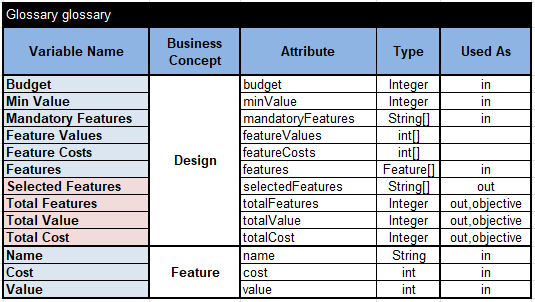
It contains the main business concept “Design”, which includes the input array “Features” with their names, costs, and values as described in the business concept “Feature”. We want our decision model to produce the output array “Selected Features” and show their “Total Features”, “Total Cost”, and “Total Value”. I decided to add two more input decision variables that allow a user to consider different scenarios when working with this decision model:
- Mandatory Features will allow a user to force the decision model to select certain features by listing their names inside this array.
- Min Value specifies the minimum value of all Selected Features.
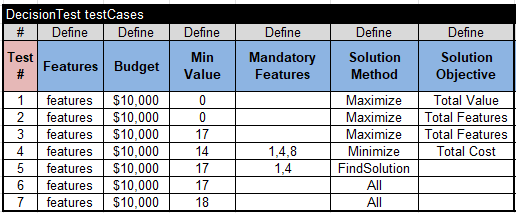
Here are test cases that allow us to experiment with minimizing/maximizing different objectives with different mandatory features and minimal total values, and even analyze all possible solutions:
Rule Solver usually requires creating two Excel tables, “Define” and “Solve”:
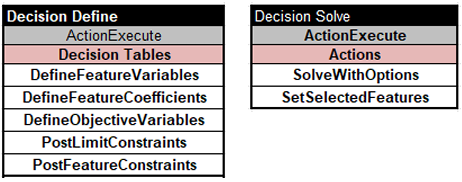
As you can see, the main focus is on the problem definition (sub-decision “Define”) with 5 tables described in detail here. The problem resolution (sub-decision “Solve”) relies on the standard Rule Solver method “SolveWithOptions” that will execute all of the above test cases. Below, I will describe testing results, all of which were received within a few milliseconds.
Test Case 1 “Maximize Total Value” (Min Value=0, no mandatory features)
- Feature-2, Feature-3, Feature-4, Feature-5
- Total Features = 4, Total Cost = 10000, Total Value = 18
The maximum value is 18, but it includes only 4 features.
Test Case 2 “Maximize Total Features” (Min Value=0, no mandatory features)
- Feature-4, Feature-5, Feature-6, Feature-7, Feature-8, Feature-9, Feature-10
- Total Features = 7, Total Cost = 8000, Total Value = 13
Total Features is 7, but the Total Value is only 13.
Test Case 3 “Maximize Total Features” (Min Value=17, no mandatory features)
- Feature-3, Feature-4, Feature-5, Feature-6, Feature-8, Feature-9, Feature-10
- Total Features = 7, Total Cost = 10000, Total Value = 17
This is probably the best solution.
Test Case 4 “Minimize Total Cost” (Min Value=14 and mandatory features 1,4, 8)
- Feature-1, Feature-4, Feature-6, Feature-8
- Total Features = 4, Total Cost = 9000, Total Value = 14
Test Case 5 “Find Solution” (Min Value=17 and mandatory features 1,4)
- Feature-1, Feature-4, Feature-5, Feature-6, Feature-10
- Total Features = 5, Total Cost = 10000, Total Value = 17
Test Case 6 “Find All Solutions” (Min Value=17 and no mandatory features)
Our decision model finds 21 feasible solutions:
Solution #1:
- Feature-3, Feature-4, Feature-5, Feature-6, Feature-8, Feature-9, Feature-10
- Total Features = 7, Total Cost = 10000, Total Value = 17
Solution #2:
- Feature-3, Feature-4, Feature-5, Feature-6, Feature-7, Feature-9, Feature-10
- Total Features = 7, Total Cost = 10000, Total Value = 17
…
Solution #21:
- Feature-1, Feature-3, Feature-5, Feature-6
- Total Features = 4, Total Cost = 10000, Total Value = 17
Test Case 7 “Find All Solutions” (Min Value=18 and no mandatory features)
Solution #1:
- Feature-2, Feature-3, Feature-4, Feature-5
- Total Features = 4, Total Cost = 10000, Total Value = 18
It proves that there is only one solution with Total Value 18.
 OpenRules - Decision Intelligence Platform