Today, four days before the start of DecisionCAMP-2025, we announced the public availability of the Advanced Rules Learner, a Machine Learning (ML) product designed for business users and well-integrated into the OpenRules Decision Intelligence Platform. Now it can generate working decision models based only on a set of problem examples. I will demo the latest capabilities during my presentation at DecisionCAMP on Sep 22 at noon EDT. You may preview my slides ahead of time. Why did we decide to enhance Rule Learner?
For quite a while, Rule Learner has been capable of automatically discovering business rules from historical records without forcing the users to become experts in statistics or ML in general. It has been successfully applied to real-world projects since 2007. In 2020, we even made it available as a SaaS on the Cloud, allowing subject matter experts to use Rule Learner without any installation.
However, the recent GenAI hype with its promise to automatically build decision models has renewed interest in Machine Learning within the Decision Intelligence context. So, it was only natural for us to ask ourselves a question:
How could we enhance our Rule Learner to build working decision models?
The answer depends on what information Rule Learner receives as input. What information do we usually receive from a customer at the start of a decisioning project?
-
- A detailed description of the business logic needed by an LLM? Hardly.
-
- An overview of an outdated implementation? Sometimes.
-
- Samples of the input data and expected output? Very likely!
-
- Can we get more samples? Yes, in many cases!
So, we reformulated the above question as the following:
Can Rule Learner generate an initial working decision model based on problem samples only? And without LLM’s “hallucinations”?
Just published Rule Learner 11.1.0 provides a positive answer! If previous versions required two Excel tables (one with a problem glossary and another with samples), the new Rule Learner requires only a simple CSV file with samples of input and expected output. A user may enter this information from an intuitive graphical view similar to the one described in the sample “Lenses”:

After a click on the button “CREATE”, Rule Learner will generate the proper decision model (in this case “Lenses” inside the folder “C:\Learner\Lenses”), which typically contains the following components:
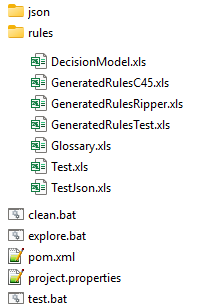
The folder “rules” contains all generated Excel files that represent this decision model, including the Glossary, various versions of Business Rules, and Test Cases. Based on the selected Deployment Type (such as AWS Lambda, MS Azure, SpringBoot, etc.), Rule Learner generates files needed for testing/execution, analysis, deployment, and enhancement of the decision model.
The automatically created decision model can be understood and enhanced by a subject matter expert using the OpenRules Decision Modeling IDE.
Additionally, Rule Learner 11.1.0 allows you to define special Filtering Rules that may filter the provided samples to exclude outliers and/or generate different decision models concentrating only on selected issues within large sets of samples with historical data. You can see an example of filtering rules in the included project “Credits“.
You can install Rule Learner 11.1.0 for free now. It comes with sample data for various business problems for which you might build decision models with one click. More importantly, you might provide Rule Learner with your own problem samples in a CSV file, and then generate, analyze, and enhance your own decision model.
With this release, “Rule Learner” effectively becomes “Decision Model Learner“. We will continue to enhance it depending on the available input. In particular, when Rule Learner receives a plain English descrition of the problem, it will use GenAI advances to generate more valuable information.
 OpenRules - Decision Intelligence Platform