
Being at the heart of any decision model, OpenRules Glossary uses mandatory columns “Variable Name”, “Business Concept”, “Attribute”, and “Type” to define all used decision variables. It also may include many optional columns such as “Description”, “Used As”, and “Default Value” that allow you to effectively control the input and output of the decision model [read more]. The new OpenRules Release 10.4.1 adds new features to the Glossary that allow our customers to build more flexible JSON interfaces for OpenRules Decision Services.
When your decision model is deployed as a RESTful web service, Glossary lets you to build and validate the proper JSON interface. OpenRules automatically generates examples of JSON input files based on the test cases defined in the tables DecisionTest. For example the standard sample decision model VacationDay include this glossary
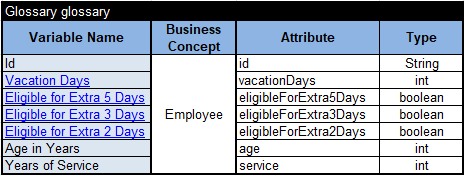
When your decision model is deployed as a RESTful web service (such as VacationDaysRest), it can be executed against JSON requests such as follows:

However, sometimes our customers prefer to use different JSON formats, e.g. the same using the French or other national language or more explicit attribute names including spaces. The new OpenRules Release 10.4.1 accommodates such requests by adding new optional columns “Attribute JSON Name” and “Business Concept JSON Name” to the Glossary.
Let’s look at the new sample project “VacationDaysJson” included in the standard installation of Release 10.4.1. Here is its glossary:
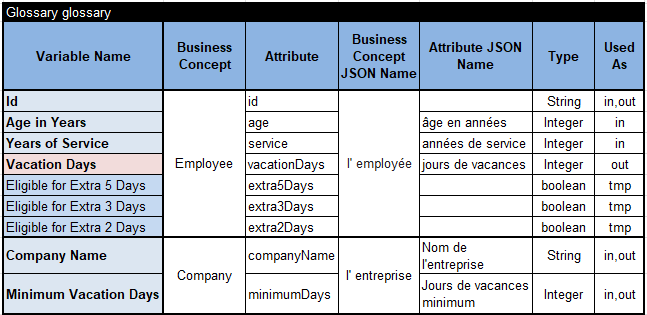
It includes two business concepts “Employee” and “Company” and their JSON names are specified in French as “l’ employée” and “l’ entreprise” in the column “Business Concept JSON Name”. Some attributes also have French names defined in the column “Attribute JSON Name”.
You can deploy this decision model as a REST service using “runLocalServer.bat”. Then if you test it with POSTMAN, you will get the following results:
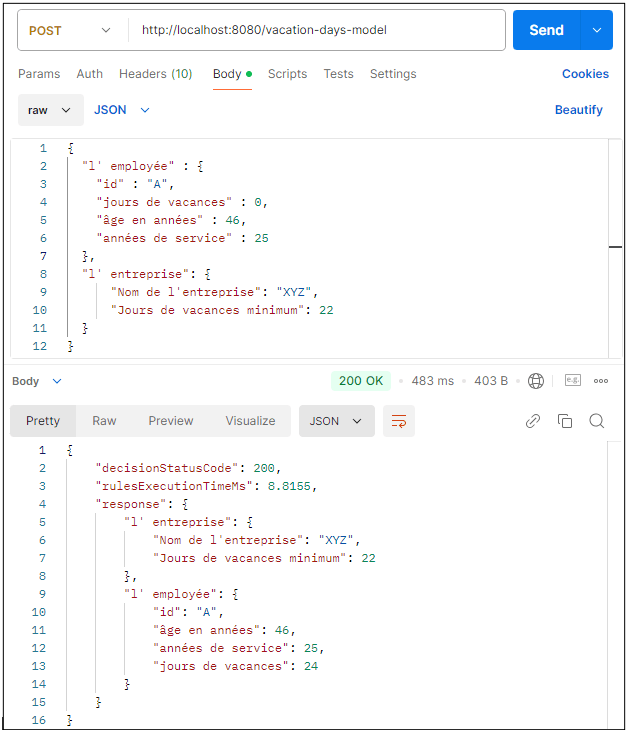
Instead of French, you may use other national languages. While names in the column “Attribute” should follow the JavaBeans convention (start with a lowercase letter and are camel-cased from there), you may use longer names with spaces and special characters in these new columns.
Note that the above POSTMAN’s response does not show temporary attributes extra5Days, extra3Days, and extra2Days. Why? This was achieved by marking them as “tmp” in the Glossary column “Used As”. You may use this new indicator “tmp” to exclude any variable from the decision model’s JSON response.
You also may control the case sensitivity of JSON attributes by adding the property “json.naming” in your file “project.properties”. If you add the property
json.naming=same_as_glossary
the JSON properties will use exactly the same names of attributes and business concepts as they are specified in the Glossary.
 OpenRules - Decision Intelligence Platform