
OpenRules supports decision tables applied to all element of collections of objects. The phrase [for each <element> in >collection>] added to the end of the decision table signature applies the rules to every <element> of the <collection>. In this post I will explain additional iteration capabilities now available to OpenRules customers.
Let’s start with a basic iteration over one collection. The following decision table iterates over the collection “Employees” of the type Employee[] to determine if the company has high-paid employees:

For each Employee from Employees the first Condition checks if the current Employee’s Salary >= High Salary. If “yes”, the first Action will set the variable “Company Has High-Paid Employees” to TRUE and the second Action will execute the predefined ACTION-BREAK to interrupt the iteration loop. If “not”, the same rules will be applied to the next Employee.
Here “Employee” is a business concept defined in the glossary. However, instead of [for each Employee in Employees]you can write [for each employee in Employees] or even [for each emp in Employees] with type and result will be the same as in these cases “employee” and “emp” will be considered as local variables defined only within this loop without necessity to define them in the Glossary. You may try to do these experiments using the project “Iterations” included in the standard OpenRules installations – see the folder “OpenRulesDecisionManager”.
Let’s consider a more complex project “AnalyzeEmployees” from the standard OpenRules repository “OpenRulesSamples“. It deals with the business concept “Company” that has an array of “Employees” described in the following glossary:

The next table iterates over the collection “Employees”:

Here conditions deal with expressions like “Salary of Employee” and “Marital Status of Employee” applying the keyword “of” to the current Employee (read more). The last ActionExecute will invoke another decision table “EmployeesAtSelectedZipCodes” for each Employee. This table will iterate over “Locations of Employee”:

This is an example of nested loops. Here is how these two loops are shown in the automatically created decision diagram:

Multiple Nested Loops. You can place the same decision table inside several nested loops as in the example below:

Here new lines and spaces in the first signature row are only for readability. ACTION-BREAK will break the execution of all loops.
OpenRules also provides a special “ActionNestedLoops” that simplifies nested iterations over the same collection – see the standard project “DuplicateCharges” in “OpenRulesSamples“.
Initializing Intermediate Variables Inside Loops. Sometimes you need to create intermediate variables for the current element of collection inside an iteration loop. For instance, in my solution to the Challenge “Stable Marriage” I dealt with this simple glossary:
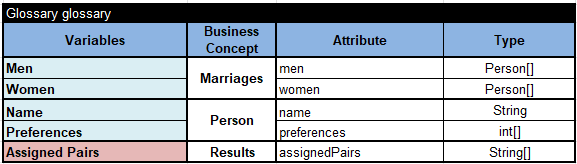
However, to define an optimization objective I needed to iterate over all Men and explicitly refer to “Preferences of Man”:

As you can see, after the for-loop I initialized an intermediate variable ManPreferences using this expression inside the loop: “ManPreferences = Preferences of Man”.
If you need more complex constructs dealing with collections of objects inside your decision models, don’t hesitate to contact support@openrules.com and we will help.
 OpenRules - Decision Intelligence Platform