
Real-world decision models usually execute multiple decisioning steps in a certain order. Whether the execution order is defined manually or automatically, the good design does not need to be explicitly interrupted if, after every execution step, the decision model validates the expected results and directs the execution to the correct branches. However, sometimes you still need to interrupt the execution of your multi-hit decision table, to break your iteration loop, or even to terminate the execution of your entire decision model. This post shows how to deal with such situations using OpenRules predefined actions “ACTION-BREAK” and “ACTION-TERMINATE”..
Interrupting Execution of Multi-Hit Decision Tables
Let’s look at the OpenRules standard example “1040EZ” that calculates a tax return using the standard US tax form 1040EZ. You can download this decision model from here. The main decision of this model is described in the following multi-hit decision table:

This decision table first executes a sub-decision “DecisionValidate” that is supposed to define if the tax return is eligible to use the form 1040EZ. The second rule checks if the variable “1040EZ Eligible” was set to FALSE, and is yes it will set the variable “RESULT” to “YOU CANNOT USE 1040EZ FORM”. Otherwise, the next 3 rules will be executed. Rule 3 will execute “DecisionCalculate” which in particular will calculate a value of the decision variable “Refund”. The rules 4 and 5 will set RESULT based on this value.
As you can see, this decision table covers all (!) possible situations. However, we could implement the same logic differently by interrupting the execution after DecisionValidate sets “1040EZ Eligible” to FALSE:
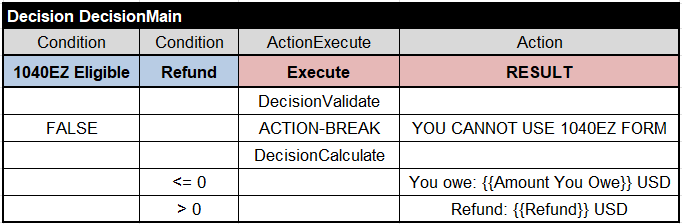
In this decision table the second rule may invoke the predefined action “ACTION-BREAK” which will skip all rules below. So, in this case the remaining rules do not need to check “1040EZ Eligible” as they will be executed only when it is not FALSE.
While both these tables produce the same results, the first one (without breaks) looks more readable and easier to understand.
Interrupting Iteration Loops
Decision models frequently use (sometimes more than necessary) iterations over collections of business objects. It occurs, for instance, when we need to find out if a collection contains certain elements. In such cases, when the needed element is found we want to interrupt the search to avoid unnecessary additional search. It can be done using the predefined action “ACTION-BREAK“. Here is a simple example. Let’s assume that there is a collection of Employees and we need to decide if it contains high-paid employees. Here is the proper decision table:

This decision table will be executed for each Employee in Employees as defined in the first row. The ACTION-BREAK in the column “ActionExecute” will force the iteration process to stop (break) when the very first high-paid employee is found.
Terminating Decision Model Execution
OpenRules also provides another predefined action “ACTION-TERMINATE” that can be used inside the decision table column “ActionExecute”. This action will terminate the execution of the entire decision model. It is useful when serious errors and the further execution makes no sense. Typical examples of such errors are the situations when important decision variables are undefined or not covered combinations of key parameters are found.
Consider the example from a real world OpenRules-based decision model which is supposed to handle different scenarios (we show only a small fragment):

When an unknown (or yet not covered) scenario is discovered, the last rule of this decision table will add the explanation “Unknown Scenario” and will terminate the decision model execution. Please note that it is very important to provide explanations and consider all not covered situations during your regression testing.
Return Code
In most cases the termination of a decision model is considered as the expected behavior and the found errors are reported using output decision variables such as “Explanations” above or “Error Messages”. When the decision model is deployed as a RESTful service its return code is 200 meaning the JSON request still was “good” (even after the termination). Sometimes our customers prefer to return a “bad” code in such situations, e.g. 400. See how it can be done in this post.
 OpenRules - Decision Intelligence Platform